Showing posts with label Database. Show all posts

Sunday, September 27, 2020

Dba Activities

Dba Activities


Introduction


In this blog i am going to explain Dba Activities in daily ,monthly,quarterly and other activities for database administrators in real time projcets and different domains and environments like production,testing,development etc


Dba Activities,oracle dba tasks checklist,dba tasks and responsibilities,senior oracle dba roles and responsibilities,oracle dba roles and responsibilities resume,oracle dba job description,sql dba roles and responsibilities,oracle dba skills,senior oracle dba job description,database administrator responsibilities,sql dba roles and responsibilities,what is main function of database administrator,what are the main duties of dba,database administrator skills,oracle dba issues and solutions,oracle database troubleshooting scenarios,oracle dba activities,database administrator responsibilities,oracle dba tasks checklist,oracle dba administrator roles and responsibilities,sql dba roles and responsibilities,all dba activities in sql server,sql dba roles and responsibilities,database administrator skills,database administrator job description


Daily Activities


  • Check the Database Availability
  • Check the listener Availability
  • Check Space Availability
  • Check any sessions Blocking the other sessions oracle locks and clear locks
  • Check long running unix process
  • Check the Alert log for an error
  • Check the Top sessions using more physical I/o
  • Deleted Locked Objects
  • Check the SQL query Consuming lot of Resources
  • Monitoring Temp and UndoTablespace
  • Taking Database/Archived Backups
  • Checked Failed backups and retrigger them
  • Health Check of the Database
  • Password lock/expired issues
  • Tuning slow running queries
  • Refresh activities- datapump
  • Check all Crontab house keeping script logs
  • Daily tablespace utilization and growth
  • Rebuilding of Indexes,if bulk load of data is inserted
  • Check the temporary tablespace/Files
  • Check locked and expired user in database and unlock/reset/informto business users
  • Check the user account grace period
  • Check the Undotablespace and retention 
  • Check the unix /tmp and /var location
  • Check the UTL_file location 
  • Check all database filesystem or drive
  • Monitor the archive log location 
  • verify sucess of database archive to tape
  • Monitor the logfiles,bakups,database space usage and the use of system resources
  • Monitoring the production database performance 
  • Find high cpu/memory/physical io consuming process and trace the sql/form/report running behind the database and update to application team/users
  • Check OEM agent is running or not in each node 
  • Verify DBSNMP is running
  • Verify sucess of database backup
  • User management and user profile monitoring on daily basis
  • Check invalid objects and recompile
  • Check and monitor audit log or table for new audit entry
  • Monitor daily failed login attempts in database and update to respective endusers
  • Backup your Crontab or windows jobscheduler
  • Taking incremental backups and monitor the sucess or failure and mail to respective stake holders
  • Check all lastnight backups were sucessful
  • Check your oracle licence and do not run/execute/create anything beyond the oracle licence expiry policy
  • Daily resolving tickets and maintained the SLA's and RPO's
  • Check audit logs for checking unauthorized access  
  • Daily checking of nagios or any ticketing tool alerts and take corrective action
  • Daily checking database reports scheduled in html formats related to both database maintanace and project functionality  


Weekly Activities


  • Growth of the database
  • Database growth Comparsion
  • Identify bad growth projections
  • Database Refresh from Production
  • Cross check weekly report of RMAN full databse backup
  • Analyse database and schema to gather statastics
  • Truncate teh listener.logfile in the $oracle_home/network/log ifthe listener log has increased to a size > 500mb ensure that the space is released,otherwise reload listener
  • Check how much redo generated perweek 
  • Archive or deleted listener log file
  • Archive or delete tracefiles from diagnostioc destination
  • Archive and compress all alertlogs and applications log history location
  • Check i/o of each data file
  • Check open_cursor not reaching the max_limit
  • Check the size of the tables & check whether it need to partition or not
  • check the objcet reload in memory many times
  • Remove audit logs since at present we have oneweek retention policy
  • Weekly checking the ADDM Reports and AWR Reports and OEM Reports if problems any found in Database 
  • Check the objects Fragmented,chaining &migrated rows
  • Check for block corruption
  • Check the free space at o/s level(weekly ,monthly)
  • Check the Invalid Objects of the database
  • Growth of the Database(weekly,monthly)
  • Taking logical backups,incase of physical backup failure


Dba Montly Activities


  • Check Database growth and free space availability at OS level request for next month  disk space to storage team
  • Check and Rebuild indexes if needed
  • Investigate fragmentation(eg rowchaining etc)
  • Check the overall database statastics
  • Trend analysis of objects with tablespace,last analyzed no ofrows,growth indays
  • Restoration of monthly fullbackups
  • Mail of backup stategy to all stake holders
  • Tablespace reorganization
  • Check default tablespace and temporary tablespace of each user


Dba Quarterly Activities


  • Database Patching
  • Bounce most critical database once a month
  • Review common oracle tuning point


Other Dba Activities


  • Install and configure oracle database on server perform database upgrades
  • Add new users to database and assignprivileges
  • Prepare the backup strategy and list all the receovery scenario
  • Perform POC ---proof of concept and show it to the client


What kind of issus will find in daily


  • Backup failure issues
  • Tablespace issues
  • File system Space
  • Alert log and Trace file house keeping
  • Gathering stats---> monitoring
  • Archived log full ---->Free up using RMAN
  • Dataguard -Rebuild if found gap more and missing archives
  • Configure/setup-disatser receovery 
  • Maintanance
  • Patching
  • Listener failure/reason if any maintanance
  • Monitoring Alert log
  • Verify instance up and running


Note : Info on  Dba Activities it may be differ in your environment like production,testing,development etc


THANKS FOR VIEWING MY BLOG FOR MORE UPDATES FOLLOW ME AND SUBSCRIBE ME


Sunday, September 6, 2020

How to Kill a Session In Oracle Database

 How to Kill a Session In Oracle Database


Introduction


In this blog How to Kill a Session In Oracle Database  we can kill oracle session by using the sql command alter system kill session and also many ways to kill the session why we we kill the process bacause  inactive and holding locks, process for long time it will occupies more memory and more resources the users are unable to login the database or hanging the system it will take take long time 


 Now let us start the process How to Kill a Session In Oracle Database


The syntax to kill a session in oracle database 


ALTER SYSTEM KILL SESSION ‘SID,SERIAL#’ IMMEDIATE;


Here sid,serial# can be obtained from v$session view


select sid,serial# from v$session where username like 'CHAITANYA'


Step 1: first get the sid and serial# of the session;


Here the session is executing the query SELECT * FROM CHAITANYADBA;


Use the below query to get the sid and serial# of this sql query.


COL SQL_TEXT format a45


SQL>  SELECT a.sid,a.serial#,substr(b.sql_text,1,200) sql_text from v$sql b,

     v$session a where a.sql_id=b.sql_id and  upper(b.sql_text)

     like '%CHAITANYADBA%' and upper(b.sql_text) not like '%V$SQL%';  2  


       SID    SERIAL# SQL_TEXT

---------- ---------- ---------------------------------------------

33 26316 select * from chaitanyadba


Now kill session :


SQL>  alter system kill session '33,26316'  immediate;


System altered.


For Oracle RAC Database


You can login to the same instance where session is running and then run the above alter system kill session command or you can use the  below command also


ALTER SYSTEM KILL SESSION 'SID,SERIAL#, @INSTANCE_ID';


where instance_id is the instance where the current session is running this command is useful  when you want to kill multiple session from instance in oracle rac database,generally this command is used for want to clear session which is inactive and holding locks ,long running session if the command is not able to kill the session as it has to undo lot of transaction, it will return as marked for killed , once the undo is over ,it will killed itself ,if the session is not doing  undo but it is stuck some where ,you can kill the sever process in th ebackground to clear the session


SQL> ALTER SYSTEM KILL SESSION ’31,3123';


ALTER SYSTEM KILL SESSION ’31,3123'

*

ERROR at line 1:

ORA-00031: session marked for kill


SQL> select username, status from v$session where SID=12;


USERNAME STATUS

——————– ——–

CHAITANYA  KILLED


 How to kill the server process associated with session


NON RAC DATABASE


SELECT s.sid, s.serial#, p.spid

FROM v$session s, v$process p

WHERE s.paddr = p.addr

AND username = 'CHAITANYA';


RAC DATBASE


SELECT s.inst_id, s.sid, s.serial#, p.spid

FROM gv$session s, gv$process p

WHERE s.paddr = p.addr

AND s.inst_id = p.inst_id

AND username = 'CHAITANYA';


Once you executing this sql query we will get the SPID yo can login to database server and kill the SPID


ps -ef | gep <SPID>


Confirm this is  oracle database shadow proces and kill it


kill -9 <spid>


DISCONNECT SESSION


There is another command which can be usedto kill oracle session


alter system disconnect session 'SID,SERIAL#' POST_TRANSACTION | IMMEDIATE;


USEFUL QUERIES FOR KILL ORACLE SESSION


Query to generate kill session command for all sessions with given schema name


select 'alter system kill session ' ||''''|| sid||','|| serial#||''''||';' from v$session where SCHEMANAME='CHAITANYA'


Here i am using CHAITANYA is the schema like scott


Query to generate kill oracle session command for all session with the given module and status being inactive


col event format a30

col module format a15

col program format a30

set lines 100

select 'alter system kill session ' ||''''|| sid||','|| serial#||''''||';'

from v$session_wait sw, v$session s

where sw.sid = s.sid

and sw.sid in (select sid from v$session where module like '%&module%')

and s.status='INACTIVE';


Query to Genearte kill session command for all session which are connecting with sqlplus


select 'alter system kill session ' ||''''|| s.sid||','|| s.serial#||''''||';'

from v$session s where program like '%sqlplus@%'


Query to check killed session in oracle


select sid, serial#, status, username , module, form

from v$session s where status like '%KILLED%'


Query to remove killed session in oracle database


Non RAC database


SELECT 'kill -9 '|| p.spid

FROM v$session s, v$process p

WHERE s.paddr = p.addr

AND s.status = 'KILLED';


RAC database


SELECT 'kill -9 '|| p.spid

FROM gv$session s, gv$process p

WHERE s.paddr = p.addr

AND s.inst_id = p.inst_id

AND s.status = 'KILLED';


Query to check inactive session in oracle database


select sid, serial#, status, username , module, form

from v$session s where status like '%INACTIVE%'


Query to kill inactive session in oracle


select 'alter system kill session ' ||''''|| s.sid||','|| s.serial#||''''||';'

from v$session s where status like '%INACTIVE%'


IDENTIFY THE SESSION USING THE GV$SESSION and GV$PROCESS VIEWS AS FOLLOWS


SET LINESIZE 100

COLUMN spid FORMAT A10

COLUMN username FORMAT A10

COLUMN program FORMAT A45


SELECT s.inst_id,

       s.sid,

       s.serial#,

       --s.sql_id,

       p.spid,

       s.username,

       s.program

FROM   gv$session s

       JOIN gv$process p ON p.addr = s.paddr AND p.inst_id = s.inst_id

WHERE  s.type != 'BACKGROUND';


   INST_ID        SID    SERIAL# SPID       USERNAME   PROGRAM

---------- ---------- ---------- ---------- ---------- ---------------------------------------------

         1         30         25 3859       PROD       chaitanya@chaitu-12gr2.localdomain (TNS V1-V2)

         1         13        387 3834       SYS        abhiram@chaiu-12gr2.localdomain (TNS V1-V2)

         1         30        487 4663                  manasa@chaitu-12gr2.localdomain (Z003)

         1         28        225 4665                  pavan@chaitu-12gr2.localdomain (Z001)


Note: Info on How to Kill a Session In Oracle Database it maybe differ in your enviroment like production,testing ,development and naming conventions etc 


THANKS FOR VIEWING MYBLOG FOR MORE UPDATES FOLLOW ME OR SUBSCRIBE ME


Thursday, September 3, 2020

Enable or Disable in Archive log mode in Oracle Database

 Enable or Disable in Archive log mode in Oracle Database


Introduction


Two types of logging mode in oracle database


1.Archivelog mode: In this Archivelog mode after the online redo logs are filled , it will move to the archive location,archivelog mode you can put the database in for creating a backup of all transactions occured in the database so that you can recover at any point of time 


2.Noarchivelog mode:In this Noarchivelog mode Filled  online redo logs wont be accepted,archives are insted they will be overwritten, In this mode absence of archivelog and database not be recoverd at any point of time 


Enable archive log mode


SQL > select name,log_mode from v$database;


NAME      LOG_MODE

--------- --------------------

PROD      NOARCHIVELOG


SQL > archive log list

Database log mode              No Archive Mode

Automatic archival             Disbled

Archive destination            /chaitanya/arch/PROD

Oldest online log sequence     206506

Next log sequence to archive   206512

Current log sequence           206512


 make sure db is running in spfile


SQL > alter system set log_archive_dest_1='LOCATION=/chaitanya/arch/PROD' scope=spfile;

database altered.


SQL >shutdown  immediate;

Database closed.

Database dismounted.

ORACLE instance shut down.


SQL > startup mount

ORACLE instance started.

Total System Global Area 5415597568 bytes

Fixed Size                  2170304 bytes

Variable Size             805970240 bytes

Database Buffers         6502926848 bytes

Redo Buffers                3530176 bytes

Database mounted.


SQL >alter database archivelog;


database altered.


SQL >alter database open;


database altered.


SQL >select name,log_mode from v$database;


NAME      LOG_MODE

--------- --------------------

PROD      ARCHIVELOG


SQL >archive log list

Database log mode              Archive Mode

Automatic archival             Enabled

Archive destination            /chaitanya/arch/PROD

Oldest online log sequence     206506

Next log sequence to archive   206512

Current log sequence           206512


Disable archivelog mode


SQL >select name,log_mode from v$database;


NAME      LOG_MODE

--------- -----------

PROD      ARCHIVELOG


SQL > archive log list

Database log mode              Archive Mode

Automatic archival             Enabled

Archive destination            /chaitanya/arch/PROD

Oldest online log sequence     206506

Next log sequence to archive   206512

Current log sequence           206512


SQL > shutdown  immediate;

Database closed.

Database dismounted.

ORACLE instance shut down.


SQL > startup mount

ORACLE instance started.

Total System Global Area 5415597568 bytes

Fixed Size                  2170304 bytes

Variable Size             805970240 bytes

Database Buffers         6502926848 bytes

Redo Buffers                3530176 bytes

Database mounted.


SQL >alter database noarchivelog;


database altered.


SQL >alter database open;


database altered.


SQL > select name,log_mode from v$database;


NAME      LOG_MODE

--------- ----------------------

PROD      NOARCHIVELOG


SQL > archive log list

Database log mode              No Archive Mode

Automatic archival             Disbled

Archive destination            /chaitanya/arch/PROD

Oldest online log sequence     206506

Next log sequence to archive   206512

Current log sequence           206512


Info: Info on enable or disable archivelog mode it may be differ in your environment like production,testing,develoment etc


THANKS FOR VIEWING MY BLOG FOR MORE UPDATES FOLLOW ME OR SUBSCRIBE ME

Enable or Disable Flashback Technology in Oracle

 Enable or Disable Flashback Technology in Oracle


Introduction


Using Flashback Technology  we can restore the database and dropped users,and tables,schemas  in oracle we will flashback the database to past when the database ,user,table,schema is available at the time of dropped database before.


Here in this blog i am going to expalin how to enable or disable by using Flashback technology in oracle


Let us start the process


Enable Flashback


The Database must be in archive log mode


Here i am showing how to enable archive log mode


SQL > select name,log_mode from v$database;


NAME      LOG_MODE

--------- ----------------------

PROD      NOARCHIVELOG


SQL > archive log list

Database log mode              No Archive Mode

Automatic archival             Disbled

Archive destination            /chaitanya/arch/PROD

Oldest online log sequence     206506

Next log sequence to archive   206512

Current log sequence           206512


 make sure db is running in spfile


SQL > alter system set log_archive_dest_1='LOCATION=/chaitanya/arch/PROD' scope=spfile;

database altered.


SQL >shutdown  immediate;

Database closed.

Database dismounted.

ORACLE instance shut down.


SQL > startup mount

ORACLE instance started.

Total System Global Area 5415597568 bytes

Fixed Size                  2170304 bytes

Variable Size             805970240 bytes

Database Buffers         4502926848 bytes

Redo Buffers                3530176 bytes

Database mounted.


SQL >alter database archivelog;


database altered.


SQL >alter database open;


database altered.


SQL >select name,log_mode from v$database;


NAME      LOG_MODE

--------- --------------------

PROD      ARCHIVELOG


SQL >archive log list

Database log mode              Archive Mode

Automatic archival             Enabled

Archive destination            /chaitanya/arch/PROD

Oldest online log sequence     206506

Next log sequence to archive   206512

Current log sequence           206512


To enable flashback we need to set two parameters 


DB_RECOVERY_FILE_DEST


DB_RECOVERY_FILE_DEST_SIZE


SQL> alter system set db_recovery_file_dest='/home/oracle/prod';


System altered.


SQL> alter system set db_recovery_file_dest_size=12g;


System altered.


SQL> show parameter db_recovery_file


NAME TYPE VALUE

------------------------------------ ----------- ------------------------------

db_recovery_file_dest string /home/oracle/prod

db_recovery_file_dest_size big integer 10G


Turn on Flashback


SQL> select flashback_on from v$database;


FLASHBACK_ON

-----------------------

NO


SQL> alter database flashback on;


Database altered.


SQL> select flashback_on from v$database;


FLASHBACK_ON

---------------------

YES


Disable Flashback


SQL> select flashback_on from v$database;


FLASHBACK_ON

------------------

YES


SQL> alter database flashback off;


Database altered.


SQL> select flashback_on from v$database;


FLASHBACK_ON

----------------------

NO


Note : if you are using 10g or above versions then we need to enable or disable in flashback mode in mount stage


shutdown immediate

startup mount

alter database flashback off;

alter database open


Note : Info on enable or disable flashback technology it may be differ in your environment like production,development,testing and directories etc


THANKS FOR VIEWING MY BLOG FOR MORE UPDATES FOLLOW ME OR SUBSCRIBE ME


Monday, August 31, 2020

Flashback technology Recover a Dropped User in Oracle

Flashback technology  Recover a dropped user in oracle


Introduction


Using Flashback Technology  we can restore the dropped user in oracle we will flashback the database to past when the user is available at the time of dropped before,

Then take the export dump of the schema and restore the database to same current state once database is up we can import the dump file  


Prerequisites


1. Database must be Archivelog mode


2.Flash back must be enable for the database


3.All the flashback log and  Archive log should be available from the time the user is dropped 


Let us start the process


1.Make sure flashback and archive mode is enable.


SQL> select flashback_on,log_mode from v$database;


FLASHBACK_ON       LOG_MODE

------------------ -------------------------------

YES                                 ARCHIVELOG


2. lets drop the user and test the scenarios


04:47:15 SQL> select table_name from Chaitu_table where owner='CHAITANYA';


TABLE_NAME

----------------------------------------------------------------------------

ACCTTABLE1

MASTERTABLE2


04:47:33 SQL> drop user CHAITANYA cascade;


User dropped.


3.Flashback the database past when the user was available at that time


04:52:15 SQL> shutdown immediate;

Database closed.

Database dismounted.

ORACLE instance shut down.

04:52:50 SQL> startup mount;

ORACLE instance started.


Total System Global Area 1.1107E+10 bytes

Fixed Size                  7644464 bytes

Variable Size            9294584528 bytes

Database Buffers         1711276032 bytes

Redo Buffers               93011968 bytes

Database mounted.


04:53:08 SQL> flashback database to timestamp to_date('20-AUG-2020 04:47:33','DD-MON-YYYY HH24:MI:SS');


Flashback complete.


4. Open the database in readonly mode


04:55:13 SQL> ALTER DATABASE OPEN READ ONLY;


Database altered.


04:55:31 SQL>  select table_name from chaitu_tables where owner='CHAITANYA';


TABLE_NAME

--------------------------------------------------------------

ACCTTABLE1

MASTERTABLE2


we can see the tables are available now


5. Take export backup of the schema CHAITANYA


# exp owner=CHAITANYA file=chaitanya.dmp


Export: Release 12.1.0.2.0 - Production on Tue Aug 20 05:17:45 2020


Copyright (c) 1982, 2014, Oracle and/or its affiliates.  All rights reserved.


Username: / as sysdba


Connected to: Oracle Database 12c Enterprise Edition Release 12.1.0.2.0 - 64bit Production

With the Partitioning, OLAP, Advanced Analytics, Real Application Testing

and Unified Auditing options

Export done in US7ASCII character set and AL16UTF16 NCHAR character set

server uses AL32UTF8 character set (possible charset conversion)


About to export specified users ...

. exporting pre-schema procedural objects and actions

. exporting foreign function library names for user CHAITANYA

. exporting PUBLIC type synonyms

. exporting private type synonyms

. exporting object type definitions for user CHAITANYA

About to export CHAITANYA's objects ...

. exporting database links

. exporting sequence numbers

. exporting cluster definitions

. about to export CHAITANYA's tables via Conventional Path ...

. . exporting table                           ACCTTABLE1     75341 rows exported

EXP-00091: Exporting questionable statistics.

. . exporting table                          MASTERTABLE2        44 rows exported

EXP-00091: Exporting questionable statistics.

. exporting synonyms

. exporting views

. exporting stored procedures

. exporting operators

. exporting referential integrity constraints

. exporting triggers

. exporting indextypes

. exporting bitmap, functional and extensible indexes

. exporting posttables actions

. exporting materialized views

. exporting snapshot logs

. exporting job queues

. exporting refresh groups and children

. exporting dimensions

. exporting post-schema procedural objects and actions

. exporting statistics

Export terminated successfully with warnings.


6. Now restore the database to current state


SQL> shutdown immediate;

Database closed.

Database dismounted.

ORACLE instance shut down.

SQL> startup mount

ORACLE instance started.


Total System Global Area 1.1107E+10 bytes

Fixed Size                  7644464 bytes

Variable Size            9294584528 bytes

Database Buffers         1711276032 bytes

Redo Buffers               93011968 bytes

Database mounted.


SQL> recover database;

Media recovery complete.


SQL> alter database open;


Database altered.


7. create the empty user and import the dumpfile


SQL> create user chaitanya identified by chaitanya;


User created.


SQL> grant connect,resource to chaitanya;


Grant succeeded.


# imp file=chaitanya.dmp fromuser=CHAITANYA TOUSER=CHAITANYA


Import: Release 12.1.0.2.0 - Production on Tue Aug 20 05:23:59 2020


Copyright (c) 1982, 2014, Oracle and/or its affiliates.  All rights reserved.


Username: / as sysdba


Connected to: Oracle Database 12c Enterprise Edition Release 12.1.0.2.0 - 64bit Production

With the Partitioning, OLAP, Advanced Analytics, Real Application Testing

and Unified Auditing options


Export file created by EXPORT:V12.01.00 via conventional path

import done in US7ASCII character set and AL16UTF16 NCHAR character set

import server uses AL32UTF8 character set (possible charset conversion)

. importing DBACLASS's objects into DBACLASS

. . importing table                        " ACCTTABLE1 "      75341 rows  imported

. . importing table                        "MASTERTABLE2"          44 rows imported


 we can restore the schema user chaitanya by using flashback technology


Note : Info on Flashback technology it may be differ in your environment like production,testing ,development and naming conventions 


THANKS FOR VIEWING MY BLOG FOR MORE UPDATES FOLLOW ME OR SUBSCRIBE ME 


Sunday, August 30, 2020

Recycle Bin in Oracle Database

 Recycle Bin in Oracle Database


Introduction

In windows  have a recycle bin to all deleted files will be store like wise in oracle database also 

provided recycle bin which keeps all the dropped objects.

When we drop a table (DROP TABLE TABLE_NAME) in the database , The tables will logically be

 removed but it still exists in the same tablespace 

but with a prefix BIN$$ .And it will not release the space also


Note : The Recycle bin which will not work sys owned objects it will worked on user objects only


If we drop a table using purge command, tables willbe removed completely (even from recycle bin also)


How to check the recycle bin is on or off


1.SQL> show parameter recyclebin;


NAME                                 TYPE        VALUE

------------------------------------ ----------- ------------------------------

recyclebin                           string      on


SQL> select name,value from v$parameter where name like '%recyclebin%';


NAME         VALUE

------------ ------------

recyclebin   on


2.Drop a table and check the table is there in the recycle bin or not  


SQL> drop table chaitanya.CHAITUTABLE;


Table purged.


SQL> select owner,OBJECT_NAME,ORIGINAL_NAME,DROPTIME,CAN_UNDROP from dba_recyclebin where ORIGINAL_NAME='CHAITUTABLE';


OWNER              OBJECT_NAME                                   ORIGINAL_NAME      DROPTIME            CAN

------------------ --------------------------------------------- ------------------ ------------------- ---

CHAITANYA           BIN$fxhnqWVcPLTgVAAQ4B8y7Q==$0                CHAITUTABLE         2020-01-10:12:45:03 YES


Now the table is in recycle bin we can recover the table if required


3. For purging the table for recyclebin

  in order to remove the table from recyclebin also


SQL> purge table chaitanya.CHAITUTABLE;


Table purged.


SQL>  select owner,OBJECT_NAME,ORIGINAL_NAME,DROPTIME,CAN_UNDROP from dba_recyclebin where ORIGINAL_NAME='CHAITUTABLE';


no rows selected


4. To purge complete recyclebin


SQL> select count(*) from dba_recyclebin;


  COUNT(*)

----------

       102


SQL> purge recyclebin;


Recyclebin purged.


SQL>  select count(*) from dba_recyclebin;


  COUNT(*)

----------

         0


5. To drop a table without keeping in recyclebin


SQL> select count(*) from CHAITANYA.chaitusample;


  COUNT(*)

----------

     82269


SQL> drop table CHAITANYA.CHAITUSAMPLE purge;


Table dropped.


SQL> select owner,OBJECT_NAME,ORIGINAL_NAME,DROPTIME,CAN_UNDROP from dba_recyclebin where ORIGINAL_NAME='CHAITUSAMPLE';


no rows selected


Note : Info on Recycle bin in oracle it may be differ in your encironment like production, testing,development and naming conventions 


THANKS FOR VIEWING MY BLOG FOR MORE UPDATES FOLLOW ME OR SUBSCRIBE ME

Saturday, August 29, 2020

Hot and Cold Backup in Oracle

 Hot and Cold Backup in Oracle


Introduction


In Oracle basically we use either offline or Online backups, Offline backup is called as COLD backup and online backup is called HOT backup


Backups are two types---> Physical ------>Files(Control file,Data Files,Redolog files)

                                     |---->Logical--------->Data


These Data/Files need to protect from any disaster for that we need to manage backups


Physical Backup: physical backups will have interms of Files using Hot and Cold backup we can take backups


Cold Backup:


Cold backup is a physical backup in which all the files of a  database are copied without any change means it avoids the risk of copying data and hence the image copy is 

can be easily moved to another system having the same operating system,it is the safest way of take back up of All data in the database that is controlfile(.ctl files),Datafiles(.dbf files)

and Redolog files(.logfiles) Cold back are not recommended to take backup for larger databases it will take more time and space consumption client will not accept down time


Process


While taking cold backup 


Shutdown the instances


Complete full consistent backup


Traditional backup


Steps


1. Shutdown instances


2.Copy the Physical files using unix cp command


Note: /orabackup/prod/cold


$ mkdir -p /orabackup/prod/cold


shutdown immediate


Taking db files backup


$ cp /oradata/prod/*.dbf         /orabackup/prod/cold


or


$ cp /oradata/prod


$cp * /orabackup/prod/cold


Taking Control files backup


$ cp /oradata/prod/*.ctl        /orabackup/prod/cold


or


$ cp /oradata/prod


$cp * /orabackup/prod/cold


Taking redolog files backup


$ cp /oradata/prod/*.log        /orabackup/prod/cold


or


$ cp /oradata/prod


$cp * /orabackup/prod/cold


Hot Backup


Hot backup is also physcial backup including the risk of copying data because during the hot backup the database is totally open and available for users that is online.when a full backup of database is required for the hotbackup

 database must be running in the ARCHIVELOG mode, 


Is a inconsistent backup


is incomplete backup


is  a traditional backup


while hot backup ,database must be up and running also database be in archivelog mode,while in hot backup mode ,The database must be freezed can read but cannot write into datafiles so the changes are written into archivelog files tills ends,once the backup ended ,the changes are recovered into datafiles from archivelog


Process


1.archivelog mode


2.begin backup mode


3.copy the files


4.end backup


1. SQL> archive log list


2. SQL> select files #,status from v$backup;


3. SQL> alter database begin backup;


4. $ cp /oradata/prod/*.dbf   /orabackup/prod/hot


5.SQL> alter database end backup


6 . SQL> alter database  backup controlfile to '/orabackup/prod/hot/control01.bkp' ;


Note : Info on hot and cold backup it may be differ in your environment like production,testing,development and directory structures and naming conventions


THANKS FOR VIEWING MY BLOG FOR MORE UPDATES FOLLOW ME OR SUBSCRIBE ME 


Thursday, August 27, 2020

Oracle Network Configuration Files


Oracle Network Configuration Files 


Introduction:

To communicate with other systems (server machines to client machines or client machines  to server machines)  we need three network configuration files in order to communicate with the systems  in oracle  three files need to configure that is listener.ora,tnsnames.ora,sqlnet.ora,oracle net enables a network connection between a client and database server oracle net is a software component that resides on both the client  and the database server.oracle net is layered on top of a network protocol -rules that determine how applications access the network and how data is subdivided into packets for transmission across the network . 


chaitanyaoracledba blog

The example files below are relevant for an Oracle installation and instance with the following values.

HOST : chaitanyaoracledba.blogspot.com

ORACLE_HOME : /u01/app/oracle/product/12.1.0.2/db

ORACLE_SID : orcl

Service : orcl

DOMAIN : blogspot.com


listener.ora

The "listerner.ora" file contains server side network configuration parameters. It can be found in the "$ORACLE_HOME/network/admin" directory on the server. Here is an example of a basic "listener.ora" file from Linux. We can see the listener has the default name of "LISTENER" and is listening for TCP connections on port 1521. Notice the reference to the hostname "chaitanyaoracledba.blogspot.com". If this is incorrect, the listener will not function correctly.

LISTENER =

  (DESCRIPTION_LIST =

    (DESCRIPTION =      

      (ADDRESS = (PROTOCOL = TCP)(HOST = chaitanyaoracledba.blogspot.com)(PORT = 1521))

    )

  )

After the "listener.ora" file is amended the listener should be restarted or reloaded to allow the new configuration to take effect.


$ # Restart

$ lsnrctl stop

$ lsnrctl start


$ # Or Reload.

$ lsnrctl reload


The listener defined above doesn't have any services defined. These are created when database instances auto-register with it. In some cases you may want to manually configure services, so they are still visible even when the database instance is down. If this is the case, you may use a "listener.ora" file like the following.

LISTENER =

  (DESCRIPTION_LIST =

    (DESCRIPTION =

      (ADDRESS = (PROTOCOL = TCP)(HOST = chaitanyaoracledba.blogspot.com)(PORT = 1521))

    )

  )


SID_LIST_LISTENER =

  (SID_LIST =

    (SID_DESC =

      (GLOBAL_DBNAME = orcl.blogspot.com)

      (ORACLE_HOME = /u01/app/oracle/product/12.1.0.2/db)

      (SID_NAME = orcl)

    )

  )

If there are multiple database instances on the server, you can added multiple SID_DESC entries inside the SID_LIST section.

tnsnames.ora

The "tnsnames.ora" file contains client side network configuration parameters. It can be found in the "$ORACLE_HOME/network/admin" directory on the client. This file will also be present on the server if client style connections are used on the server itself. Here is an example of a "tnsnames.ora" file.

LISTENER = (ADDRESS = (PROTOCOL = TCP)(HOST = chaitanyaoracledba.blogspot.com)(PORT = 1521))


orcl.blogspot.com =

  (DESCRIPTION =

    (ADDRESS_LIST =

      (ADDRESS = (PROTOCOL = TCP)(HOST = chaitanyaoracledba.blogspot.com)(PORT = 1521))

    )

    (CONNECT_DATA =

      (SERVICE_NAME = orcl)

    )

  )

The alias used at the start of the entry can be whatever you want. It doesn't have to match the name of the instance or service. Notice the PROTOCOL, HOST and PORT match that of the listener. The SERVICE_NAME can be any valid service presented by the listener. You can check the available services by issuing the lsnrctl status or lsnrctl service commands on the database server. Typically there is at least one service matching the ORACLE_SID of the instance, but you can create more.

sqlnet.ora

The "sqlnet.ora" file contains client side network configuration parameters. It can be found in the "$ORACLE_HOME/network/admin" directory on the client. This file will also be present on the server if client style connections are used on the server itself, or if some additional server connection configuration is required. Here is an example of an "sqlnet.ora" file.

NAMES.DIRECTORY_PATH= (TNSNAMES, ONAMES, HOSTNAME)

NAMES.DEFAULT_DOMAIN = blogspot.com


# The following entry is necessary on Windows if OS authentication is required.

SQLNET.AUTHENTICATION_SERVICES= (NTS)

There are lots of parameters that can be added to control tracing, encryption, wallet locations etc. These are out of the scope of this article.

Testing

Once the files are present in the correct location and amended as necessary the configuration can be tested using SQL*Plus by attempting to connect to the database using the appropriate username (SCOTT), password (TIGER) and service (orcl.blogspot.com).

$ sqlplus scott/tiger@orcl.blogspot.com

Common Problems

The OS hostname command must return the correct hostname of your database server. If not, fix it so it does.

$ hostname

chaitanyaoracledba.blogspot.com

$

The server must have a correct entry in the "/etc/hosts" file matching the hostname and IP address of the server, as well as the loopback entry for localhost. For example in this case the values are as follows.

127.0.0.1      localhost localhost.localdomain localhost4 localhost4.localdomain4

192.168.0.100  chaitanyaoracledba.blogspot.com  chaitanyaoracledba

 If these are provided by DNS, that is fine also.

If you are using the ORACLE_HOSTNAME environment variable, possibly set in your "/home/oracle/.bash_profile", it must be set to the correct value.

export ORACLE_HOSTNAME=chaitanyaoracledba.blogspot.com

The HOST entry in the "listener.ora" file must point to an active network adapter, either real or loopback. If not, the listener will fail to start.

If the HOST entry in the "listener.ora" file is set to "localhost", the listener will start and accept connections from the local server, but not from other clients. You would typically expect this to be set to the hostname of the database server, although some people use the IP address instead.

For the client to make a connection via the listener, there must be a clear route through the network between the two machines. If you are struggling to connect, check network firewalls and the local firewall (iptables, firewalld, Windows Firewall) on the database server.


Tools for Network configuration


Oracle enables you to manage your network configuration with the following tools


Oracle Net Configuration Assistant

Enterprise manager

Oracle Net Manager


Oracle Net Configuration Assistant:  The oracle universal installer launches Oracle Net Configuration Assistant after the database is installed use oracle net configuration assistant to configure the listening protocol address and service information for an oracle database,during a typical database install,oracle net configuration assistant automatically configures a listener called LISTENER that has TCP/IP listening protocol address for the database.Oracle Net Configuration assistant prompts you to configure a listener name and protocol address of your choice.

use Oracle Network Configuration Assistant for initial network configuration after database installation there after you can use the Oracle Enterprise Manager and Oracle Net Manager to configure and administer your network


Oracle Net Manager:

You can access Oracle Net Manager from the command line or for windows platforms through the start menu


 command line (Unix,Linux or windows )run netmgr

on windows click the start button and select programs,oracle-oracle_home,configuration and migration tools, and then Net Manager  


THANKS FOR VIEWING MY BLOG FOR MORE UPDATES FOLLOW ME OR SUBSCRIBE ME


Monday, August 24, 2020

Redo Log Files in Oracle Database

 Introduction


Redo Log Files(.log): Oracle maintains logs of all the transaction against the database,These transactions are recoreded in files called online redo log files(Redo logs) The main purpose of the redo log files is to hold information as recovery in the event of system failure,redo log stores a log of all changes made to the database the redolog files must perform well and be protected against hardware failures (through software or hardware fault tolerance).if redolog information is lost,one cannot recover the system when a transcation occurs in the database,it is entered in the redo log buffers,while the data blocks affected by the transactions are not immediately written to disk,in an oracle database there are at atleast three or more redolog files,oracle  writes to redolog files in a cyclical order i.e after the first log file is filled ,it writes to the second log file,untill that one is filled .when all the redo log files have been filled,it returns to the first log file and begin overwrite its content with new transaction data.note if the database is running in ARCHIVELOG mode,the database will make a copy of the online redolog files before overwriting them


How to increase the size of the redo log files?


Steps :

`       Add new groups with larger size

        drop existing inactive members.


sql>select member from v$logfile;


  eg: expected : 100m Current : 50M  (recommended 1G-2G in live for faster performance)


Adding New Groups:


sql>ALTER DATABASE

ADD LOGFILE GROUP 4 '/oradata/prod/redo4.log' size 200m;


ALTER DATABASE

ADD LOGFILE GROUP 5 '/oradata/prod/redo5.log' size 200m;


ALTER DATABASE

ADD LOGFILE GROUP 6 '/oradata/prod/redo6.log' size 200m;


sql>select group#,members,bytes/1024/1024,status from v$log;


Use manual log switch to make use of new redo groups.


sql>alter system switch logfile;


Now drop inactive groups of different in size.


sql>ALTER DATABASE DROP LOGFILE GROUP 1;

sql>ALTER DATABASE DROP LOGFILE GROUP 2;

sql>ALTER DATABASE DROP LOGFILE GROUP 3;


IF found active - use log switch to make it inactive


sql>alter system switch logfile;


sql>select group#,members,bytes/1024/1024,status from v$log;


Managing Archive log files


logbuffer(1/3rdor3 secs)-lgwr-logfiles->archiver->arc log files


The process of turning online redo logfiles into offline

redolog files is known has archiving.


The offline redo logfiles are called Archivelog files.

with .arc ext


Its mandatory in production to enable archiving and optional in Development.


The content of archives can be used for recovery of datafiles.


Enabling Archive log mode:


Physical Dest - /archives/prod - .arc

mkdir -p /archives/prod


sql>archive log list

sql>show parameter log_archive_dest_1


format

sql>show parameter log_archive_format


sql>alter system set log_archive_dest_1='LOCATION=/archives/prod' scope=both;


sql>alter system set log_archive_format='%t_%r_%s.arc' scope=spfile;


%t - thread number associated with instance number1

%r - redo sequence

%s - log sequence number


sql>shutdown immediate

sql>startup mount

sql>alter database archivelog;

sql>alter database open;

sql>archive log list

sql>alter system switch logfile;

sql>exit

cd /archives/prod


redologfiles->arch(bg process) -> archivelogfile(.arc)


Here archiver is the background process writes from online

redo log files to off archivelog files when log switch occurs.


sql>show parameter log_archive_max_processes


We can have up to 30 max processes of archiver


$ps -ef | grep arc

default - 4


Note: Info on redolog it may be differ from your environment production,testing,dev naming conventions,and directory structure etc


THANKS FOR VIEWING MY BLOG FOR MORE UPDATES FOLLOW ME OR SUBSCRIBE ME


Sunday, August 16, 2020

Oracle oratab file

 Oracle oratab file

Introduction

oratab:


oratab file is created by the root.sh script during oracle database installation ,and it is updated by the database configuration assistant DBCA when creating or deleting  a database ,the oratab file entry is also created automatically by the database agent 


When does oratab file created?

What are the contents of oratab file?

how to read oratab file?

How do we verify number of databases on server? (from oratab file)

How to locate the binaries installed on a server for a database?


oratab file get created when root.sh script executed while install.

Will read using more command

eg: $more /etc/oratab


The contents are

SID:$ORACLE_HOME:Y/N


Note: SID - database name, System identifier

The path of oracle binaries located using ORACLE_HOME parameter


eg: /u01/app/oracle/product/12.1.0/dbhome_1


Can have multiple homes for multiple database , can find from oratab.


prod:/u01/app/oracle/product/12.1.0/dbhome_1:Y

dev:/u01/app/oracle/product/11.2.0/dbhome_1:N


Here N/Y represents, to start on server boot..

----------------

Y - Yes , to start

N - No, Will not start on boot.


To login to a database , verify the SID value from ORACLE_SID using echo command.

----------------------

$echo $ORACLE_SID

If the value is prod

the database connected to prod


IF its dev

the db is dev

If not dev,then how to connect/set


using export command can set the environment variable...to login to aparticular db.

---------------------

$export ORACLE_SID=dev

then verify

$echo $ORACLE_SID


Which location to verify , the db installed ?

using variable ORACLE_HOME

how to verify ?

$echo $ORACLE_HOME


Conclusion:


Number of databases on a server

.bash_profile

root scripts while install

Binaries path

/etc/oratab

export - to set environment variable

echo - to verify the variable

$ORACLE_SID

$ORACLE_HOME


THANKS FOR VIEWING MY BLOG FOR MORE UPDATES FOLLOW ME

Oracle Database Post Installation Root scripts


Oracle Database Post Installation Root scripts 


Introduction:


 when we install oracle Database standalone and RAC environment part of post installtion steps we execute two Root scripts oracle also suggest to backup the 'orainstroot.sh' and 'root.sh',these two scripts are executed as a root user in linux and it displays after the,oracle software installation complete 


Two scripts root.sh,orainstroot.sh


What is oratab file?

What are the contents of oratab file?

When the oratab file got created?


While installation, will execute two root scripts.

1. orainstroot.sh

will remove the permissions on inventory files from world(public).

Will change permissions to oinstall OS group.


 Importance of orainstroot.sh


 The first script that we run is  "orainstroot.sh" which is located in 


$ORACLE_BASE/oraInventory(/u01/app/oracle/orainventory)path we execute "orainstroot.sh " script for following purpose


 1)it creates the inventory pointer file(/etc/oraInst.loc) this file shows the inventory location and group is linked to 


 2)it changes the groupname of the oraInventory directory to oinstall group


2. root.sh

will create oratab file while installation using root script.


/etc/oratab

will read using

$more /etc/oratab


The contents are oratab file are the database entries.


Importance of root.sh


The second script that we run is "root.sh"  script which is located  in $ORACLE_HOME(/u01/app/oracle/product/11.2.0/db_1)path  we execute "root.sh" for the following purpose


1)it will creates /etc/oratab file.This is the file which we use to make automatic database shutdown and startup it is very important file


2)it sets the Oracle base and Home environments


3)it sets an appropriate permission to the OCR base directory


4) creates the OCR backup and network socket directories


5)modifies the ownership to "root" user on the Oracle base and Cluster home file systems


6)it configures the OCR and Voting disk (only on the first node )


7)starts the Clusterware daemons


8)it adds Clusterware daemons to the inittab file


9)It verifies the whether the Clusterware is up on all nodes


10)it verifies the super user priveliges


First Field | Second | third

ORACLE_SID : ORACLE_HOME : Y/N

prod : /u01/app/oracle/product/12.1.0/dbhome_1 : Y


Here ORACLE_SID is the db name

Y/N - represents - to start the db on server boot.


eg:

prod : /u01/app/oracle/product/12.1.0/dbhome_1 : Y

dev : /u01/app/oracle/product/11.1.0/dbhome_1 : N


In this case, How many databases are there?

Two Databases - prod,dev


Which will get start on boot ? prod

will not ?  dev


how many products are there on server?

12c

11g


-----------------------------------------------------------------------

How do we login to database?


Using tool sqlplus with sys user as sys admin with sysdba role


eg:

su - oracle ( using - will read bash_profile to locate the binary files)

$sqlplus '/as sysdba'


Here / represents sys user

or

$sqlplus sys/sys123 as sysdba

or

$sqlplus sys as sysdba

Paswd : sys123


SQL> select name,open_mode from v$database;


sql> is database prompt

# is root unix prompt


What is .bash_profile ?


is a hidden file for every unix user with dot as prefix.

To list the hidden file using

#ls -ltra


If its root user - /

If its for oracle user :- /home/oracle


Will configure variables to locate the binaries installed


eg:

ORACLE_HOME=/u01/app/oracle/product/12.1.0/dbhome_1

ORACLE_SID=prod

Here the default database was set to prod to login.


Will execute the .bash_profile to set the environment variables for that session.


Can also use manually with export command

eg:

$export ORACLE_SID=dev

Now can verify using echo

$echo $ORACLE_SID


Note : Info on Post Installation root scripts it may be differ from your environment like prod,dev,test,and naming conventions ,directories etc


THANKS FOR VIEWING MY BLOG FOR MORE UPDATES FOLLOW ME


Oracle Database Startup and Shutdown Procedure

 Oracle Database Startup and Shutdown Procedure


Introduction:


when the database before started there are four modes of startup and shutdown modes to open a database


Nomount State:


In Nomount state when the controlfile  is to ready to open,Redologfiles and database files are closed and are not accessebile ,the oracle instance is available but some of the v$ views (dynamic performance views)are available during this Nomount state  

Database may be brought to this state to perform some operation like


Creating Database


Recreating control file


eg: v$session,v$database,v$instance etc


Mount State:


In Mount state after the control file is opened and existence of all the database files and redolog files is to be verified to start up the database open 

Database may be brought to this state to perform operations like 


Backup

Recovery of the system crash or undo datafiles

change the database to archive log mode  (when you query  select name ,open_mode from v$database we will get the database is mounted)


Four Modes - -->shutdown Instance


1. shutdown normal

2. shutdown transactional

3. shutdown immediate

4. shutdown abort


1. shutdown normal


No new connections can be established

Will wait till users disconnect.

Changes are written to disk

No recovery required.

BG processes terminates and memory freed.


sql>shutdown


2. Shutdown transactional


sql>shutdown transaction


No new connections

will wait till users complete the transaction.

Changes writes in to datafiles.

no recovery is required

BG processes terminates and memory freed.


3. Shutdown immediate ( best Practice)


sql>shutdown immediate

sql>shut immediate


no new connections

Will not wait users disconnect/complete transaction

Changes written in to datafiles

uncommitted changes are rollbacked.

bg terminated and memory freed

no recovery required


4. shutdown abort

sql>shutdown abort


If database not responds then will do abort.


committed Changes will not write in to datafiles

Does need instance recovery by smon while instance startup.


THANKS FOR VIEWING MY BLOG FOR MORE UPDATES FOLLOW ME

Saturday, August 8, 2020

Oracle Databasae Architecture


Oracle Databasae Architecture

----------------------------------------

Introduction

------------------

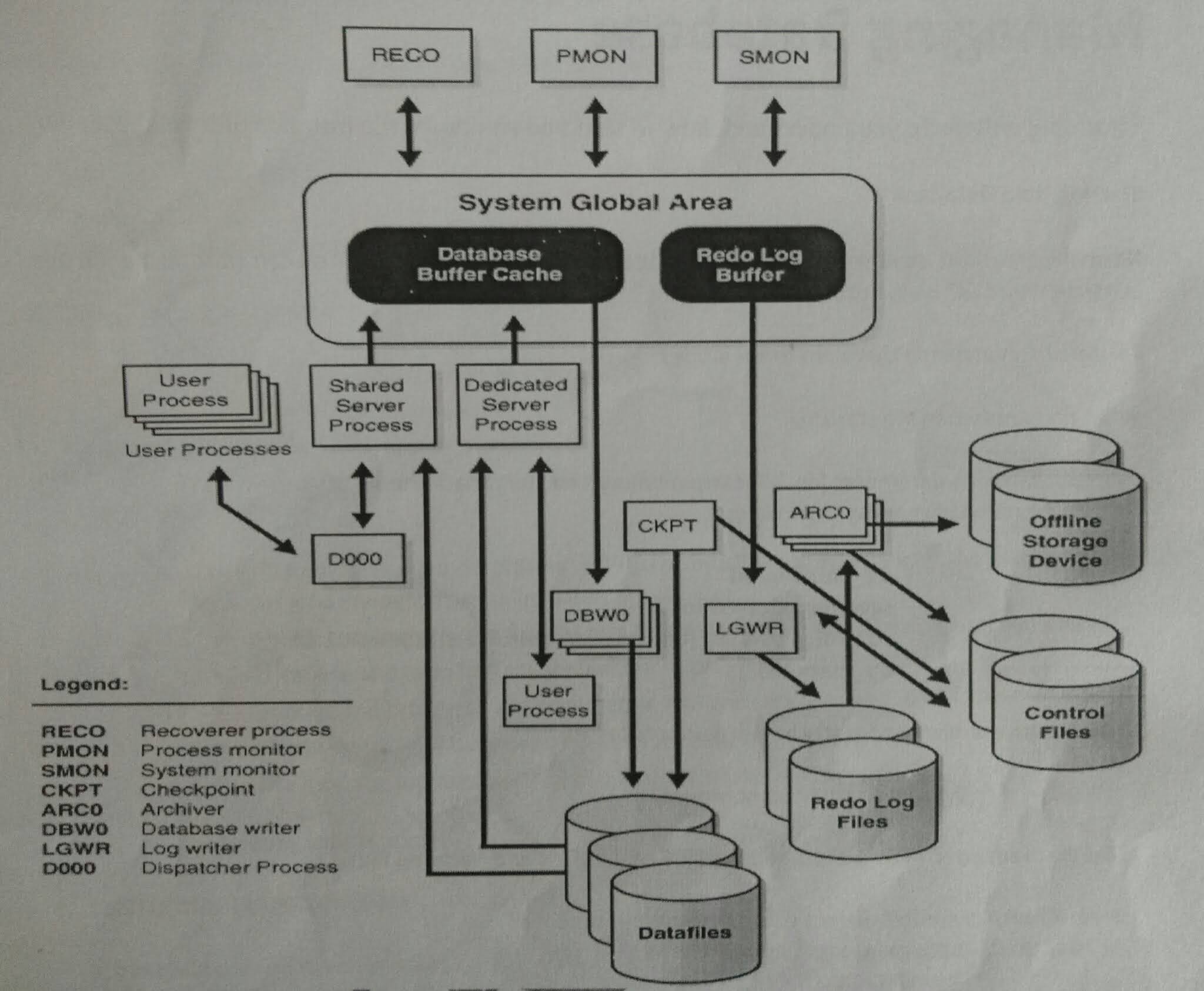
An oracle databse is a collection of data treated as a unit,The purpose of database is to store and retrieve related information, a database server is the key to solving the problems of information management,in general , aserver reliably manages large amount of data in a multiuser environmemnt so that many users can concurrently access the same data, all this is accomplished while delivering high performance.A database server also prevents unauthorized acess and provides efficient solution for failure recovery


     Oracle database is the first database designed for enterprise grid computing, the most flexible and cost efective way to manage information and applications. Enterprise grid computing create large pools of industry standard ,modular storage and servers,with this architecture,each new system can be rapidly provisoned from the pool of components there is no need for peak workloads,because capacity can be added or reallocated from the resources pools as needed Defines the components of database software database is the to store data in terms of files database can be used in these sectors

Banking

Insurance

Oil

Retails

Real estate

Airlines

Payment gateways

Govt Sectors

private setors

   The Database has a logical structures and physical structures.Because the physical and logical structures are separate,the physical storage of data can be managed without affecting the acess to logical storage structures,Oracle is an RDBMS (Relational database management systems),The oracle RDBMS stores data logically in the form of tablespaces and physically in the form of data files,the oracle database architecture can be described in terms of logical and physical structures,The advantage of separating the logical and physical structure is that the physical storage structure can be changed without affecting the logical structures.


Physical structure: The physical layer of the database consists of three types of files


One or more datafiles


two or more redolog files


one or more controlfiles


DataFiles(.dbf files): Data files stores the information contained in the database.one can have as few as one datafiles or as many as hundreds of data files.The information for a single table can span many datafiles or many tables can share a set of datafiles,the number of data files that can be configured is limited by the oracle parameter db_files, to stores permanent data


Redo Log Files(.log): Oracle maintains logs of all the transaction against the database,These transactions are recoreded in files called online redo log files(Redo logs) The main purpose of the redo log files is to hold information as recovery in the event of system failure,redo log stores a log of all changes made to the database the redolog files must perform well and be protected against hardware failures (through software or hardware fault tolerance).if redolog information is lost,one cannot recover the system when a transcation occurs in the database,it is entered in the redo log buffers,while the data blocks affected by the transactions are not immediately written to disk,in an oracle database there are at atleast three or more redolog files,oracle  writes to redolog files in a cyclical order i.e after the first log file is filled ,it writes to the second log file,untill that one is filled .when all the redo log files have been filled,it returns to the first log file and begin overwrite its content with new transaction data.note if the database is running in ARCHIVELOG mode,the database will make a copy of the online redolog files before overwriting them


Control Files (.ctl): control files record control information about all of the files with in the database,control files contain information used to start an instance, such  as the location of the datafiles and redologfiles ,oracle needs this information to start the database instance.control files must be protected,oracle provides a mechanism for storing multiple copies of control files,These multiple copies are stored on as separate disks to minimize the potential damage due to disk failure,the names of the database conntrol files are specified via the CONTROL_FILES initilization parameter. The control file is small binary file the contents of the control files are database name,time stamp creation of database,location of datafiles and redo log files,


checkpoint information of every record (dml)with scn number (system change number)

The parameter file defines the characterstics of an oracle instance.for example ,it contains parameters that size some of the memory structures in the SGA

The password file authenticates user privileged to start up and shutdown an oracle instance

The archived redo log files are offline copies of the redolog files that may be necessary to recover from media failures


sql> select name,value from v$ parameter;

sql> select name,bytes,1024/1024,autoextensible from dba_data_files;


Instance(service )startup ,shutdown

---------------------------------------


A database instance(also save as server) is set of memory structures and background process that access a set of database files,constitutes of memory structure and background process every database has one or more instancess,database running in one server has one instance,if multiple servers (RAC) will have mltiple instances


Instance = memory+Bg process


eg: host1 prod(dbname-sid)prod(instance)


sid: system identifier is the instance name


Memory Structure is divided into SGA and PGA


SGA: The SGA is also called the shared global area it is used to store database information that is shared by database process,it contains data and control information for the oracle server  and is allocated in the virtual memory of the computer where oracle resides, oracle uses an area of shared memory called the shared global area(SGA) The SGA is a shared memory region that contains data and control information for one oracle instance oracle allocates the SGA when an instance starts and de-allocates it when the instance shutdowns,every instance has the sga ,the entire SGA should be large as possible to increase the system performance and to reduce disk i/o.


From 11g ,oracle introduced Automatic memory management (AMM) using two parameter control instance memory with


SGA is set with parameter  SGA_MAX_SIZE


sql> show parameter sga_max_size (from 11g is et to zero -amm is enabled)


Memory_max_target


memory_target


RAM(64g)> memeory_max_target(60g)>=memory_target(35g-dynamic)>=sga+pga


with in the size of memory_target,oracle server distributes across sga and pga


If memory_target is set to non zero value with in the size of memory_max_target 


If memory _target>0 (AMM is enabled -->without restart dynamic)


memory_max_target>0 (static--need restart)


memory_target=0(AMM is disabled), then dba ha s manually allocate memory for sga and pga


chaitanyaoracledba blog


The information is stored in the SGA is divided into three memory structures


1)Database buffer cache 


2)Redo Log buffer


3)Shared Pool


1)Database buffers cache: The database buffer stores the most recently used blocks of data.The set of database buffers in an instance is the database buffer cache,the  buffer cache contains modified as well as unmodified blocks,because the most recently and most frequently used data is kept in memory.it improves the performance of system by reducing the i/o operations

2)Redo Log Buffer: The redo log buffer stores redo entries .these are log of changes made to the database in database buffer cache.The redo entries stored in the redo log buffers are written to an online redo log,an online redo log is a set of two or more files that record all the changes made to oracle data files and control files.

Data buffer cache: holds modified as well as unmodified blocsks most recently used (MRU) willbe kept and Least recently used (LRU) willbe written into files


oracle uses MRU and LRU algorithm


sql> show parameter db_cache_size

0 - amm is enabled


Log Buffer cache: Holds log of changes made against to database for recovery purpose in the event of system failure every 1/3 or 3 secs fills will write in online redolog files


sql> show parameter log_buffer

 1m /6m max value -recommended


3)Shared Pool : The shared pool is used to store the most recently execeuted sql and plsql statements and the most recently used data definition


it consits of two key performance related memory structures


Library cache: Library cache stores information about the most recently used sql and pl/sql statements,enables the sharing of commonly used statements,it is 


managed by the least recently used (LRU) algorithm


Data dictionary cache: The data dictionary cache is a collection of the most recently used definitions in the database,holds dictionary inforamtion of tables,indexes,users,permissions


sql>show parameter shared_pool_size

0 (If AMM is enabled) also we can give fixed value with in the size of memory_target


Program Global Area:

----------------------------


 PGA is a memory buffer that contains data and control inforamtion for a server process,A server process is a process that services a client reqeuests.A PGA is created  by oracle when a server process is started.theinformation in a PGA depends on the oracle configuration,The PGA area is non shared area of memory created by oracle when a server process is started ,the basic difference between SGA and PGA is PGA is cannot shared between multiple processes in the sense that is used only for requirements of a particular process whereas the SGA is used for the whole instance and it is shared.


chaitanyaoracledba blog


Back ground process

---------------------------

Few background process writes or read into file and memory, the trace files are only created whenthere is any problem,some of the background process are


PMON: PMON stand Process monitor and this is database backround process cleans up failed user process also relases dead locks, cleaning up the cache and freeing resorces that the process was using (its effect can be seen when a proces holding a lock is killed

 $ ps -ef |grep pmon


SMON: SMON stands for system monitor and this is database background process performs instance receovery at the start of the database,SMON also cleans up temporary segments that are no longer in use and recovers dead transcations skippedduring crash and instance recovcery because of file read or offline errors .it coalesces combines contiguos free extents into large free extents 


 $ ps - ef |grep smon


system crash--->redologfiles---->smon--.startup---->recovery changes--->datafiles


LGWR:LGWR stands for Log writer background process manages the writing of the contents of the redo log buffer to the online redolog files,LGWR writes the log entries in the batches form,the redo log buffers entries always contain the most upto date status of the database note LGWR is the only one process that writes to the online redo log files and the only one that directly reads the redo log buffer during to the database  normal database operation, writes from redolog buffer to online redo log files every 1/3 rd or 3 sec fills


$ ps -ef | grep lgwr


DBWR:DBWR stand for database writer background process is responsible for managing the contents of the datablock buffer cache and dictionary cache,DBWR  performs batch writes of changed block,DBWR doest not need to write blocks blocks when a transcation commits,can have upto 20 process with parameter db_writer_process,DBWriter writes from buffer cache to data files in batch form not on every commit


$ ps - ef | grep dbwr


CKPT: CKPT stands for check point transaction all modified information in database buffer in the sga is written to the datfiles by a database write process (DBWR) This event indicates checkpoint,the checkpoint processis responsible for signalling DBWR at checkpoints and updating all the datafiles and controlfiles of the database, onec the DBWR writes in to the datafiles then signal to CKPT a checkpint process occurs,then the ckpt process update in a datafile header and control file with the 


SCN number (system change nmber for every record)


$ ps - ef | grep ckpt


number of instances running on a server


using ps - ef |grep smon


ps -ef |grep pmon 


ARCHIVER(ARCH): The archiver process reads the redo log files once oracle has filled them and writes a copy of the used redo log files to the specified archive log destinations actually ,for most databases,the ARCH has no effect on the overall system performance


MMAN: MMAN dynamically adjust the sizes of the SGA components ,it is a new process added to oracle 10 g as part of automatic shared memory management


FMON: The database communicates with the mapping libararies provided by the storage vendors through an external non oracle database process that is spawned by  a background process called FMON,FMON is responsible for managing and mapping information 


LMON:LMON stands for Lock manager process lock monitor is an oracle background process created when you start a database instance in RAC mode the LMON process manages global locks and resources,it is also called as global enqueue service monitor,it monitor all instances in the cluster primarily for dictionary cache locks and dead locks on dead locks sensitive equeues and resources,LMON also provides cluster group services


MMON: the oracle 10 g background process to collect statastics for the automatic workload repository (AWR)


MMNL:This process performs frequent and lightweight manageability relatedtasks such as session history capture and metrics computation

WMON: The Wake up monitorprocess


RVWR: Recovery Writer oracle starts the recovery writer (RVWR)process to write the flashback data from the flashback buffer to the flash back logs


CTWR:(change tracking writer) oracle tracks the physcical location of database changes in a new file called the change tracking file.oracle backup utility the recovery manager RMAN uses the change tracking file to determine which data blocks to read during an incremental backup,making the incremental backups faster by avoiding reading entire data files.

DMON:Dataguard


DIAG: the diagnosibility process DIAG runs oracle bug commands  and triggers  diagnostic dumps as part of the new ADR(automatic diagnostic repository )feature which is replacement and major enhancement for the much reviled RDA


SMCO: The space management cordinator and slaves perform space allocation and reclamation


THANKS FOR VIEWING MYBLOG FOR MORE UPDATES FOLLOW ME


ITIL Process

ITIL Process Introduction In this Blog i am going to explain  ITIL Process, ITIL stands for Information Technology Infrastructure Library ...